From the lead to the signedquote to the invoice.
Enquiries become records, quotes get signed at the customer’s premises, job cards become invoices without retyping, and every unit of equipment carries its own service history — with the office and the field looking at the same record.
In production with its first client today. Public demonstration instance with invented data at demo.wenbru.co.za.
Run your service business from one place.
Quotes, job cards, equipment history and invoices for field-service businesses — one system for office and field, deployed per client.
Problems it answers
06 items · heard on the floor
- P.01
Quotes live in one person’s e-mail and nobody knows which are out, signed, or waiting for approval.
- P.02
Job details get phoned through and written on paper, then retyped into the invoice days later from memory.
- P.03
Nobody can say what equipment is at which customer site, or when it was last serviced, without asking someone.
- P.04
Service due dates are missed because reminders depend on someone remembering to check.
- P.05
Deposits and part-payments are tracked in someone’s head, and overdue accounts are noticed too late.
- P.06
When a technician leaves, the customer and site knowledge leaves with them.
Capabilities
08 groups · implemented- 01
Leads and enquiries
Every enquiry becomes a record in a pipeline, not an e-mail in an inbox.
- Website quote-request basket, booking form and contact form on your public site create records the office reviews and converts.
- Lead pipeline NEW → CONTACTED → QUOTED → WON / LOST with source, assigned staff member and next follow-up date.
- Technicians capture walk-in leads on the Android app; a walk-in invoice can also be saved as a lead.
- Daily follow-up digest e-mailed to each assignee when leads fall due.
- A website quote request converts to a staff quote with one action, items copied across.
- 02
Quotes and on-site signature
Quote from the office or on the customer’s premises, and get it signed there and then.
- Three-step quote builder on the app (customer → items → review) and a New Quote screen on the web, including walk-in customers.
- Prices come from the catalogue server-side; per-line and order-level discounts; VAT and totals recomputed on the server.
- Technician quotes go to PENDING APPROVAL; the owner or finance approves and sends the PDF with a 30-day signing link.
- The customer signs through the link or on the technician’s phone; signer name and date are recorded.
- Statuses DRAFT → PENDING APPROVAL → ISSUED → CLIENT SIGNED → ACCEPTED, plus DECLINED and VOID with a reason.
- 03
Job cards and work allocation
The quote becomes work, the work becomes a job card, nothing is retyped.
- A signed quote starts a job card with the quoted items copied in; job cards run DRAFT → PENDING APPROVAL → INVOICED.
- On site the technician logs a service record against each unit, adds extra items and captures the customer’s completion signature.
- Submitting a job card requires the signature; approvers are notified by push.
- Approval creates the invoice from the actual work done, with the delivery signature carried over.
- Dashboard tiles for quotes to assign, quotes pending approval and job cards to invoice.
- 04
Invoicing and payments
Tax invoices from the job, on your letterhead, with payments and deposits tracked.
- Sequential numbering; invoices from a quote, an approved job card, a booking, or as a walk-in / cash sale.
- Payment terms on receipt or net 30 with due date, an optional deposit-required note, customer PO number and attachments.
- Send the PDF with a “confirm work completed” signing link; record full or partial payments; upload proof of payment; send reminders.
- Invoices move to OVERDUE automatically after the due date; statuses UNPAID, PARTIAL, PAID, OVERDUE, VOID.
- Client statement PDF with invoiced, paid, outstanding and overdue totals, downloadable or e-mailed.
- 05
Equipment register and service history
Know what is on every customer site and when it was last serviced, in one click.
- One record per physical unit: serial number, manufacturer, model, location on site, last and next service dates, configurable interval.
- Statuses ACTIVE, IN WORKSHOP, DECOMMISSIONED, MISSING; every status, customer or location change written to a movement log.
- Service records — inspection, refill, repair, replacement, installation — with technician, certificate number and pass/fail; logging a service rolls the next due date forward.
- Physical check with undo, replace-unit (history stays on the old record), swap with workshop stock, decommission.
- Automated service-due and overdue reminder e-mails to customers, a Monday office digest, and a per-customer equipment register PDF.
- 06
Catalogue of products and services
One price list drives the website, the quotes and the invoices.
- Simple products and variable families with variants; simple and grouped services with options.
- The sellable unit carries the authoritative price; the parent mirrors the lowest active variant automatically.
- Visibility per item: PUBLIC on the website, STAGED, INTERNAL for staff quoting only, ARCHIVED.
- Owner-managed admin for products, variants, services, options, visibility and images; every change audited.
- 07
Staff, roles and audit trail
Each person sees what their role needs, enforced on the server.
- Three working roles — OWNER, FINANCE, TECHNICIAN — with a server-enforced capability matrix.
- Owner creates staff, sets roles, deactivates accounts and resets passwords; password or role changes revoke that user’s sessions.
- Optional work-hours lockout per staff member; account lockout after repeated failed logins; self-service password reset.
- Append-only audit trail — database triggers block edits and deletes — recording who did what, from which portal, on which record.
- 08
Documents, e-mail and the field app
Documents that look like your business, and the same records on the technician’s phone.
- PDF quotation, tax invoice (legal name, VAT number, banking block, 15 % VAT, discounts, terms, signatures), client statement and equipment register — letterhead, colour and banking from your configuration, not from code.
- E-mails for quotes, invoices, reminders, service due and overdue, signature confirmations, statements and registers.
- Push notifications to the Android app: approvers on submitted quotes and job cards, staff on assignment, owners on website requests.
- The Android app: role-based home, quotes and quote builder, job cards with signature, equipment register and service log, invoices, leads, bookings — the same records as the office.
- In-app update banner when a new version is published; PDFs open from the app.
Wenbru Service Business Management Software
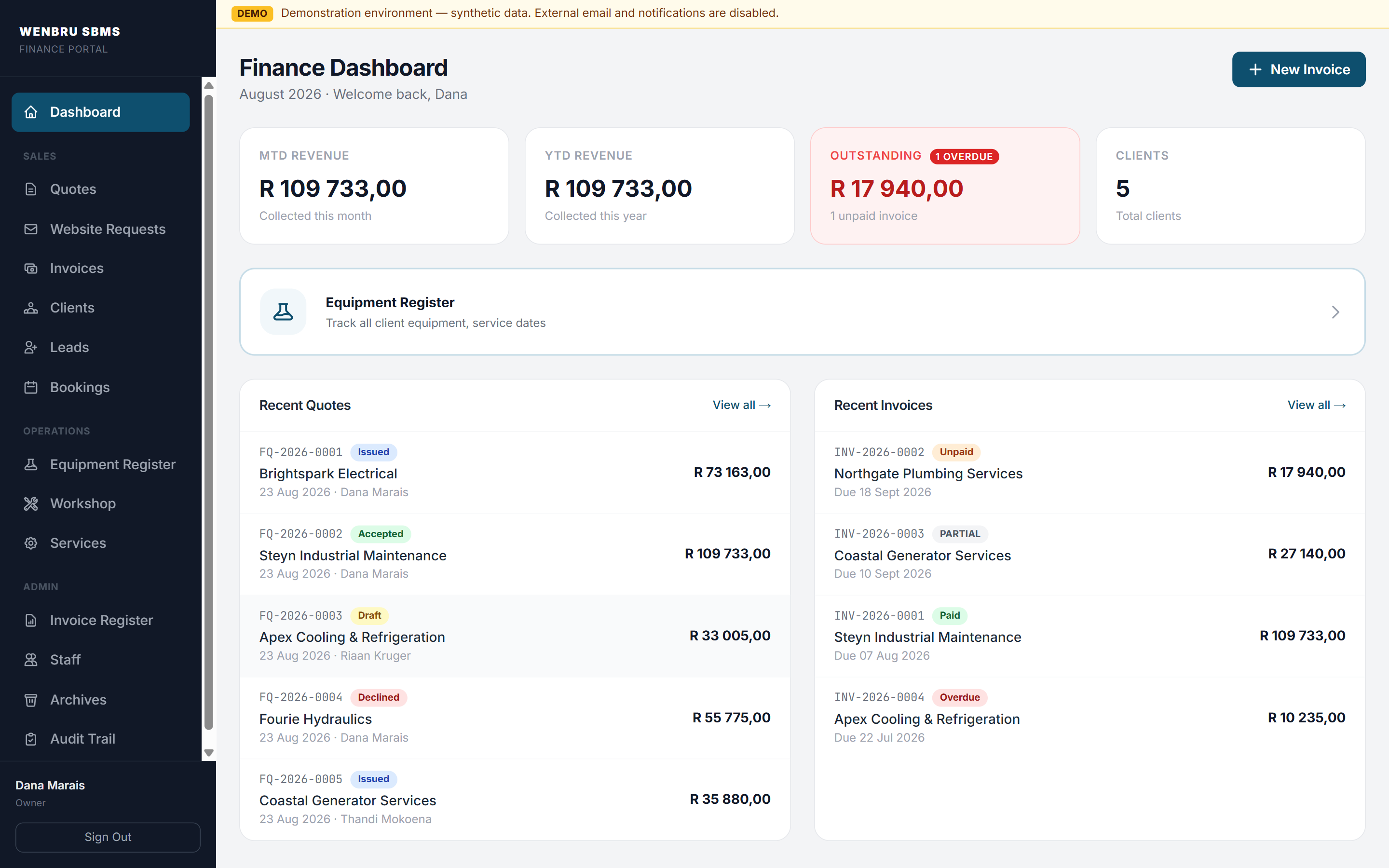
Bill of features
08 items| Item | Feature | Description |
|---|---|---|
| Pending approvals | Quotes to send and job cards to invoice, at the top of the owner’s screen. | |
| Quote statuses | Draft, issued, signed, accepted, declined — one vocabulary on web and phone. | |
| Signed on site | Signature, signer name and date on the record. | |
| Job card | Quoted lines copied in; units serviced; completion signature. | |
| Equipment unit | Serial, location, last and next service, movement log. | |
| Invoice states | Unpaid, partial, paid, overdue — moved automatically after the due date. | |
| Your letterhead | Legal name, VAT number, banking and colour from configuration. | |
| Audit trail | Append-only; who did what, from which portal. |
How it works
Run your service business from one place.
05 stages · ENQUIRY → PAID
- Stage 0101/05
Lead
Website quote requests, bookings and walk-ins arrive as records in a pipeline — NEW, CONTACTED, QUOTED, WON — not as e-mails.
ENQUIRY → LEAD → QUOTE - Stage 0202/05
Quote, signed on site
Build the quote in the office or on the customer’s premises; prices come from the catalogue; the customer signs on the technician’s phone or through a link.
DRAFT → ISSUED → CLIENT SIGNED - Stage 0303/05
Job card
The signed quote starts a job card with the lines copied in; the technician logs each unit serviced and captures the completion signature.
SIGNED QUOTE → JOB CARD → APPROVED - Stage 0404/05
Equipment register
One record per physical unit with serial, location, last and next service; every movement logged; due and overdue reminders sent to the customer.
UNIT → SERVICE RECORD → NEXT DUE - Stage 0505/05
Invoice & PDF
The invoice is built from the work actually done, on your letterhead with your banking details; payments, deposits and overdue accounts tracked.
JOB CARD → TAX INVOICE → PAID
Workflows
03 workflows · 13 steps · read left to right
From website enquiry to signed quote
04 steps
- 01Request
A customer builds a basket on your website and submits; they get a confirmation and the office is notified.
- 02Convert
One action turns the request into a staff quote with the items copied.
- 03Approve · send
The office adjusts lines and discounts, approves and sends the PDF with a 30-day signing link.
- 04Sign
The customer signs through the link, or the technician captures the signature on site.
From signed quote to job card to invoice
05 steps
- 01Start job card
The technician opens the signed quote on the app; the quoted items are copied in.
- 02Service
A service record against each unit of the customer’s equipment; extra items added.
- 03Sign off
The customer signs on the technician’s phone; the job card is submitted for approval.
- 04Invoice
Finance approves; the invoice is created from the actual work with the delivery signature attached.
- 05Paid
The PDF goes out with payment terms; payments and deposits are recorded against it.
Keeping the equipment register
04 steps
- 01Register
A unit installed at a site is added from the invoice, the web or the app; it receives an asset tag.
- 02Service
Each visit logs a service record; the next due date rolls forward.
- 03Remind
Thirty days before a unit falls due the customer is e-mailed; overdue units appear in the Monday digest.
- 04Swap · retire
Faulty units are swapped from workshop stock; decommissioned units keep their history.
Where it runs
04 surfaces · one record
- S.01Public website on your domainHomepage, product catalogue with variants, quote-request basket, booking and contact forms, e-signature pages, app download page.
- S.02Web portalDashboard, quotes, website requests, invoices, customers, leads, bookings, equipment register, workshop, catalogue admin, reports, staff, archives, audit trail.
- S.03Android field appClient-branded per deployment; technicians’ jobs, quotes, job cards, equipment, leads; owner dashboard and approvals; installed from your download page.
- S.04Documents and e-mailQuotations, tax invoices, statements and equipment registers on your letterhead, sent with signing links.
Deployment & stack
07 deployment rules · 07 stack lines · 05 exclusions
- D.01Isolation model: each client gets a separate deployment with its own database, own storage, own generated secrets and own domain and branding. A new deployment starts from an empty baseline, never from another client’s data. This is the Wenbru-hosted model, proven in acceptance with two independent test deployments.
- D.02One product, many clients: a single generic product image is run per client with a validated configuration file. Two independent test deployments were run from the identical image and proven unable to reach each other.
- D.03Configuration, not code: identity, legal details, banking, domain, brand palette, letterhead, equipment vocabulary, asset-tag prefix and optional modules are per-client configuration, recorded as revisions.
- D.04Fail-closed: with no valid configuration the server refuses to serve; there is no fallback identity.
- D.05Wenbru-hosted: a five-container stack per client on its own private network; the host’s public web server is the only ingress. Cloud flavour: a dedicated managed project per client with provider-managed TLS.
- D.06Backups: nightly database dump, encrypted client-side and pushed to a per-client off-site destination; every hosted deployment is restore-tested before it is marked ready.
- D.07Append-only audit log for logins, quote and invoice changes, payments, voids, staff and catalogue changes; a separate movement log for every equipment change.
- Next.js (React, TypeScript) with Tailwind CSS
- PostgreSQL 17 with row-level security behind a Supabase-compatible data API; all money stored as integer cents
- Expo / React Native Android app; release-signed APK from your download page
- PDF generation server-side; transactional e-mail; Expo push notifications
- Signed JWT sessions with revocation; bcrypt; input validation; rate limiting on public forms and login
- Docker Compose stack per client for Wenbru-hosted deployments; a dedicated managed project per client for the cloud flavour
- Continuous integration with automated tests and an artifact identity scan that fails the build if any client identity is found in the product image
- We do not run a shared multi-tenant database for SBMS clients. Each client runs in its own deployment.
- We do not claim AI, offline mode or an iOS app. The app is Android; it needs a connection.
- We do not collect card or EFT payments online — a locked decision.
- We do not integrate with accounting packages today.
- We do not e-mail overdue reminders automatically — the system marks invoices overdue; a person decides to send the reminder.
Service businesses
Service businesses that install, maintain or inspect equipment at customer sites — fire safety, electrical, refrigeration, plumbing, generators, hydraulics, industrial maintenance
Built for
F.01 – F.04- Service businesses that install, maintain or inspect equipment at customer sites
- Owners who want the quote signed before the technician leaves the premises
- Offices that need to answer “what is on that site and when was it serviced?” in one click
- Finance staff who want tax invoices, statements and the VAT register from one place
Probably not for
N.01 – N.04- Retail point-of-sale or online card payments
- Businesses that need accounting-package integration today
- iOS-only field teams
- Field teams that must work fully offline
Straight answers
Q.01 – Q.06 · plain answers
Bring us a job card.
Send one job the way it runs today — paper, WhatsApp, spreadsheet. We will show you how it runs in Wenbru.